
3PO
Touch-free continuous speech translation with lifelike voices
Most translation tools feel like vintage walkie-talkies. You tap a button, say a sentence, wait for a robotic voice, and tap again. That works for ordering coffee, but it breaks down completely in a 90-minute lecture, a foreign-language presentation, an international tour, or a long dinner conversation.
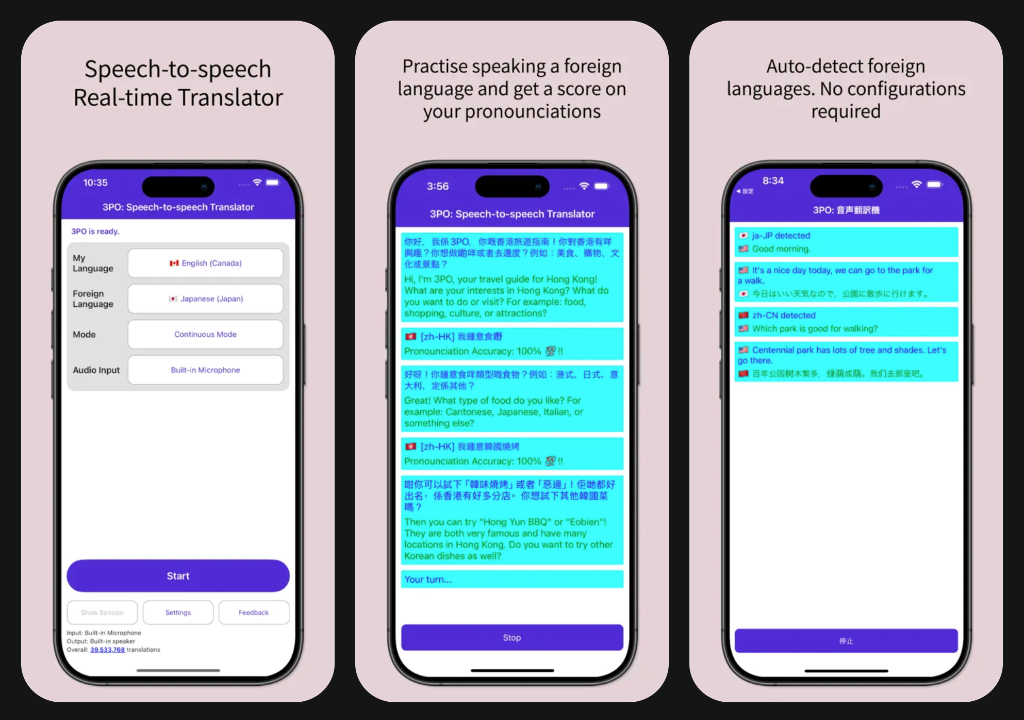
3PO was built from the ground up for continuous, hands-free listening. Tap Start once, drop your phone in your pocket, and pop in your earbuds. 3PO listens, segments speech automatically, and translates uninterrupted for up to four hours.
Unlike standard translators that pause when your phone sleeps, 3PO operates fully in the background. Lock your screen, take notes, or look up directions while translated audio flows quietly into your headphones. Plus, every translation is voiced by high-fidelity neural speech engines tuned for regional nuance—so speakers sound like real people, not flat machines.
Now available on iPhone, Android, and Mac. On macOS, 3PO Pro introduces direct system audio translation: translate audio outputted from your Mac directly (Zoom, Teams, webinars, YouTube, and videos) in real time with zero room noise and no microphone required.
Built Different from Traditional Translators
Standard translation apps are built for quick, turn-by-turn phrases. 3PO is built for uninterrupted, immersion-grade listening.
- Touch-Free, Continuous Translation: designed for lectures, tours, sermons, and extended conversations (up to 4 hours). Tap Start once and just listen—no tapping back and forth after every sentence.
- True Background Operation: keep translating with your screen locked or while taking notes in another app. Translated speech streams reliably to your headphones.
- High-Quality Neural Voices: say goodbye to monotone robot voices. 3PO uses expressive, human-quality neural speech synthesis with region-accurate pronunciation (like Canadian French vs. Parisian French, or Mexican vs. Castilian Spanish).
- Automatic Two-Way Conversation: in two-way chats, 3PO auto-detects who is speaking from 73+ languages without manual toggle switches.
3PO Pro on Mac & System Audio
3PO Pro is a one-time lifetime unlock across your devices. On macOS, Pro unlocks direct system audio translation alongside all core Pro features.
- Direct System Audio Translation (macOS Pro): capture sound outputted from your Mac directly. Translate webinars, conference calls (Zoom, Teams, Google Meet), and video streams in real time.
- Mic Not Required: no microphone setup needed. Captures internal digital audio cleanly with zero room echo, background chatter, or keyboard clicks.
- Apple Universal Purchase: unlocking 3PO Pro once covers your Mac, iPhone, and iPad under the same Apple Account.
- Live Broadcast Hosting: host multilingual broadcasts for groups where listeners tune in on their phones in their chosen language.
- Saved Session History: review, search, and export past conversation transcripts with timestamps.
- Accelerated Cloud Translation: route requests automatically to the lowest-latency regional cloud node.
Features
- Continuous Translation: touch-free, uninterrupted listening for up to 4-hour sessions
- Full Background Operation: translates seamlessly with screen locked or while multitasking
- High-Quality Neural Voices: natural cadence and authentic regional accents across 73+ languages
- System Audio Translation (macOS Pro): translate computer audio directly from meetings and videos—mic not required
- Zero-configuration Conversation Mode: auto-detects both speakers' languages automatically
- Broadcast Mode: host live multi-language talks or join with a 6-character code
- Practice Mode: real-time pronunciation scoring and feedback
- Saved Session History (3PO Pro): search, review, and export full transcripts
- Multi-Device Mode: real-time translation with friends over the internet
- Q&A Mode: ask questions in 100+ languages powered by Gemini
Release Notes
Introduces 3PO Pro on Mac with Apple Universal Purchase. Unlocks direct macOS system audio translation (no microphone required), live broadcast hosting, and saved session history.
Adds a direct Release Notes link in Settings to view version history. Clearly identifies System Audio as a Pro feature in audio input options. Enhances floating window translation and improves background session stability.
Optimizes speech service connection reliability with smart key usage balancing and automatic regional failover.
Improves selection feedback for Text Only and Text + Audio translation output controls in active translation sessions with distinct visual highlighting and tactile feedback.
Updates minimum requirement to macOS 26+. Improves system audio capture on Mac Catalyst with an unconstrained global tap capturing across all active audio outputs, enhanced error diagnostics, and audio recording capture without screen recording permission.
Extends translation session limits up to 4 hours for 3PO Pro users and clarifies session limits.
Shows a clear Pro status banner when unlocked, improves connection speed measurement, and optimizes purchase verification.
Automatically activates Pro speech keys and updates the server speed indicator immediately upon Pro purchase or restore without restarting the app.
Introduces 3PO Pro as a one-time unlock for Broadcast hosting, saved session history, automatic speech-service recovery, and priority customer support. Joining a broadcast stays free.
Added display of server speed.
Introduces 3PO Pro as a one-time unlock for Broadcast hosting, saved session history, automatic speech-service recovery, and priority customer support. Joining a broadcast stays free.
iOS and Android production. Stopping a session returns immediately while speech resources clean up in the background. Last Session review again shows Main Menu and Share Content so you can return home or share your transcript.
iOS and Android production. Stopping a session returns immediately while speech resources clean up in the background. Last Session review again shows Main Menu and Share Content so you can return home or share your transcript.
iOS and Android production. Conversation and Continuous sessions let you choose Text Only or Text + Audio. Conversation starts in Text Only. Practice Mode returns to the main menu when you stop. Continuous Mode pauses if your headset disconnects mid-session.
iOS and Android production. Broadcast hosts get a QR code and join link after starting a session; listeners can follow in a browser. Muting a broadcast no longer shows a false connection error.
iOS and Android production. Broadcast Mode: host a live translated talk for many listeners, or join with a 6-character code. Free during beta. Open Settings and tap Join beta program so Broadcast Mode appears in the mode picker. Live Azure voice catalog per Speech region (no bundled voice JSON).
iOS and Android production. Promote Broadcast Mode with an in-app What’s New dialog and updated Join Beta copy. Broadcast hosts may use a single recognition language.
iOS and Android production. Fixed tap on overall translation count incorrectly showing a meeting expired error.
iOS and Android production. Stability and reliability improvements (Multi-Device Mode hidden; Continuous-mode gated-audio Sentry reporting narrowed to unexpected headset route loss, Fixes C3PO-A8).
iOS and Android production. Clearer message when the speech connection fails so Continuous/Transcription sessions no longer look blank.
Android production. Improved stability on some Android devices (IntermediateActivity null-Intent crash, C3PO-4G).
iOS and Android production. Better diagnostics when Continuous mode cannot play translation audio (Sentry route breadcrumbs and a once-per-session warning if playback is gated).
iOS TestFlight beta. Production Sentry telemetry for Continuous mode when translation audio is ready but playback is gated (route breadcrumbs + once-per-session warning). Validates the 5.0.5 Bluetooth audio fix in the field.
iOS and Android production. Added more space between chat history and session controls.
iOS production. Continuous mode plays translated speech more reliably through Bluetooth headphones (AirPods A2DP route preserved).
iOS and Android production. Utility buttons grow with larger OS text sizes so labels stay readable. Status bar no longer has an uneven top hairline.
Android production. Tablets and foldables use the full screen (no portrait letterboxing); phones stay in portrait.